
9x12 Sites: Build Your Business Website Fast
9x12 Sites gives postcard operators a professional landing page in one afternoon — setup wizard, live card preview, built-in analytics, and lead capture.
Most operators overthink their web presence. They spend weeks picking WordPress themes, fighting with plugins, trying to make their "About Us" page sound impressive. Meanwhile, they haven't sold a single slot. Here's the thing — you don't need a 15-page website. You need one page that says "here's what I do, here's proof, and here's how to get on the next card."
That's exactly what 9x12 Sites is. A postcard business website purpose-built for operators at sites.9x12method.com. No coding. No design degree. No spending three weekends arguing with your hosting provider. One page, everything a prospect needs to see, live in an afternoon.
Why most operator websites don't work
I've seen it a hundred times. Somebody joins the community all fired up, and instead of picking up the phone or hitting Facebook groups, they spend two weeks "building their brand." Custom logo. Five-page website. A blog nobody will read. An "Our Team" page where it's just them and their golden retriever.
Full transparency — I get it. It feels productive. But it's procrastination dressed up as progress.
What you actually need is dead simple:
- A way for prospects to see your card and the available slots
- A way for them to see where you're mailing
- A way for them to fill out a form and say "I'm interested"
- A way for you to track who's visiting and who's converting
That's it. That's the whole list. And that's exactly what 9x12 Sites does. Nothing more, nothing less.
The 6-step setup wizard
This is where it gets fun. When you go to sites.9x12method.com and start building your site, you don't get dropped into some blank canvas with a blinking cursor. You get a guided wizard that walks you through six steps.
- Name your business — pick your name, see it appear on a live preview of your site in real time.
- Campaign details — add your card name, slot count, pricing.
- Contact info — phone, email, the basics.
- Pick your look — choose a color scheme and layout that fits your brand.
- Connect Canva — pull in your actual card designs so prospects see real artwork.
- Review and launch — double-check everything and hit publish.
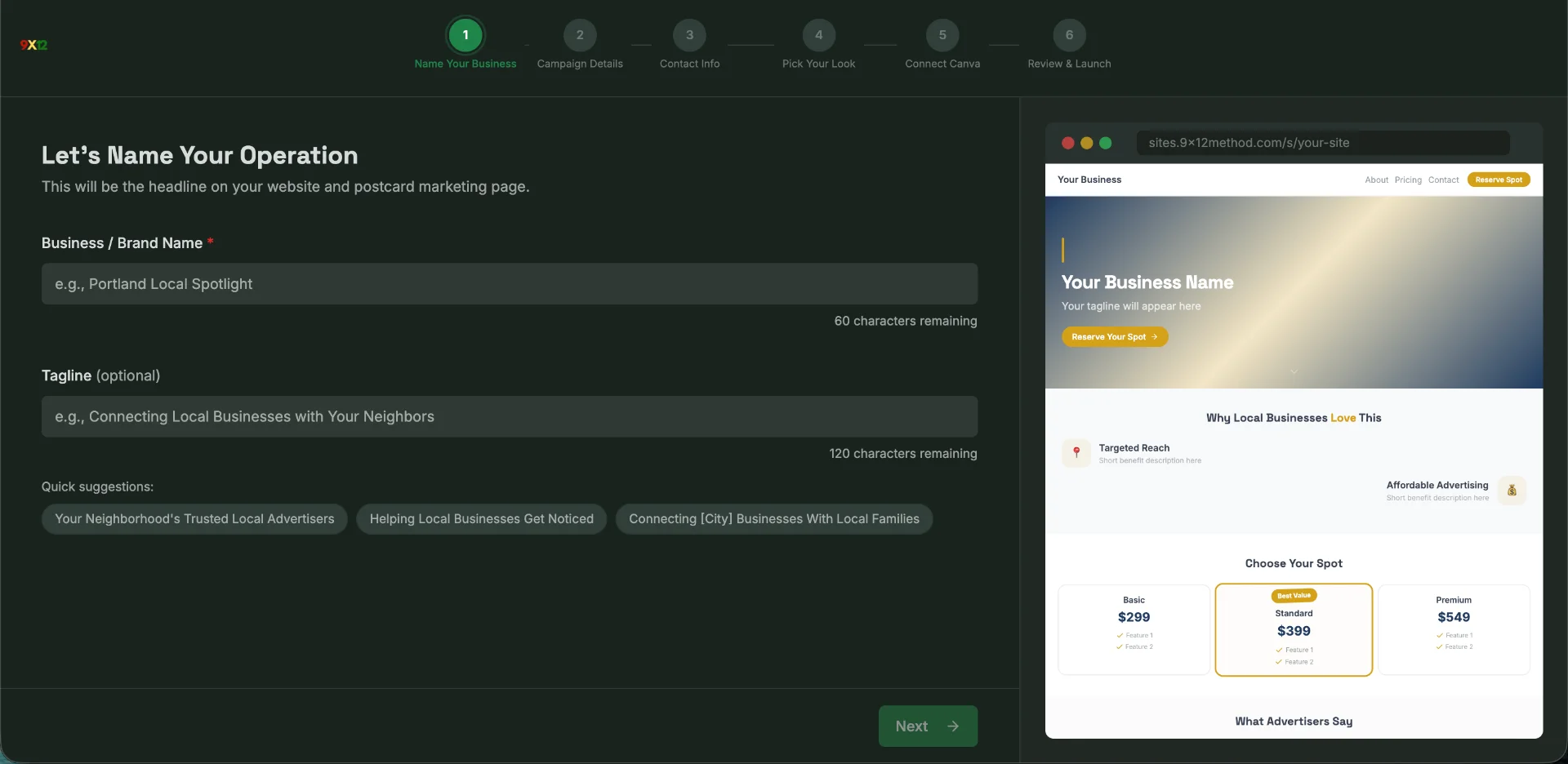
Look. I'm not exaggerating when I say you can have this done in an afternoon. Most people finish in under an hour. The wizard does the heavy lifting — you just fill in the blanks. No coding, no design skills required. It is that simple.
The live card preview — your best sales tool
Here's why 9x12 Sites is different from just throwing up a Wix page. Your site has a live card preview section where prospects can see available slots and pricing in real time.
Think about what that does psychologically. A business owner lands on your page, scrolls down, and sees your actual card. They can see which slots are still available, which ones are already sold, and exactly what it costs. They can toggle between the front and back of the card.
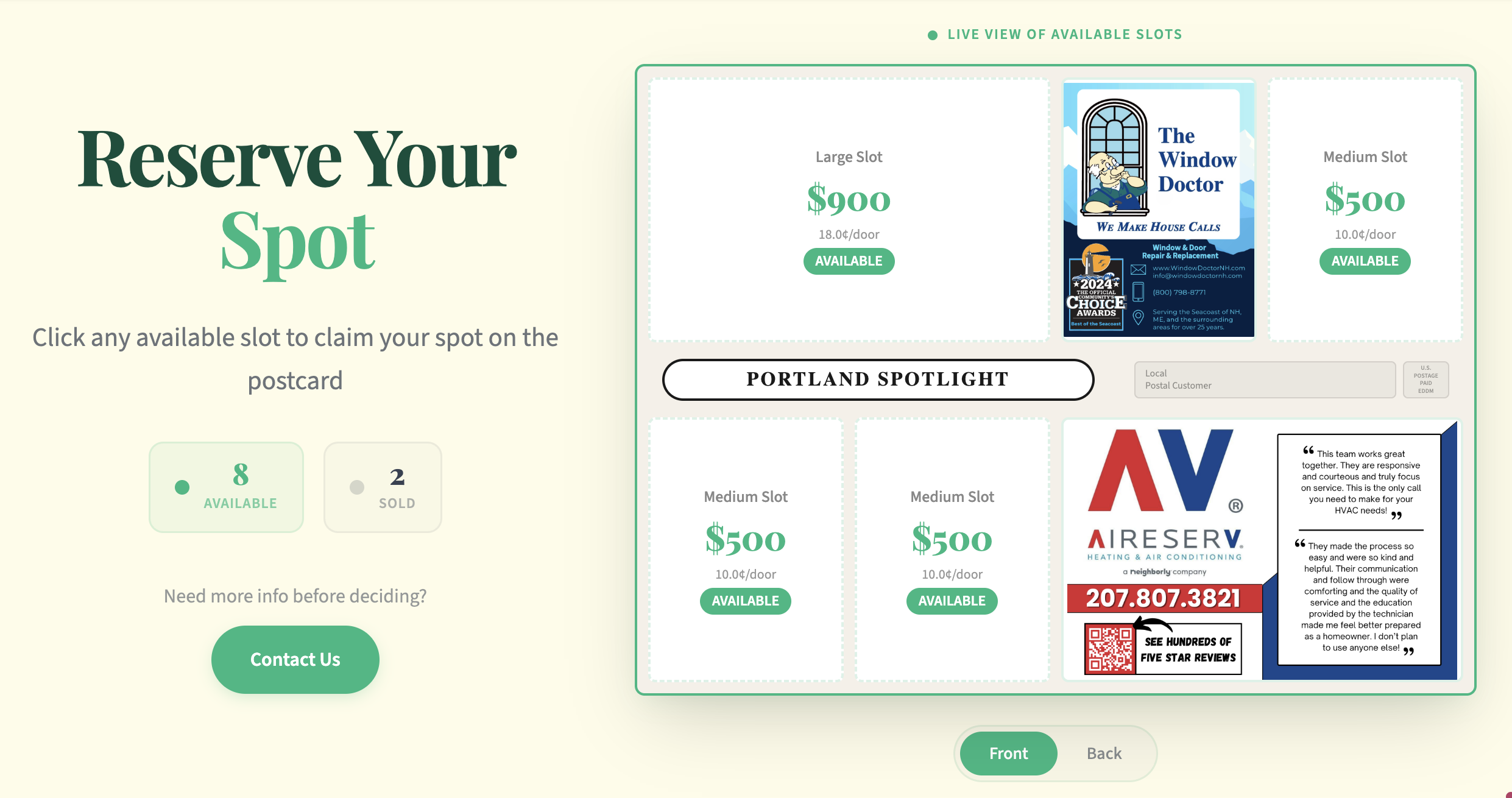
This is massive. Instead of you explaining everything on a phone call, the prospect can see it for themselves. The sold slots create urgency — "oh, there's only four spots left." The pricing is transparent — no hidden fees, no "call for a quote" nonsense.
It's a numbers game, and this feature makes your numbers better. When someone can visualize their business on that card before they've even talked to you? That's when deals close themselves.
The target map — show prospects where their ad is going
This is one of my favorite features. Your 9x12 Sites page includes a "Where We Are Targeting" section with an actual map showing the zip codes you're mailing to. Not just a list of zip codes — a real, visual map.
And it doesn't stop there. It also shows:
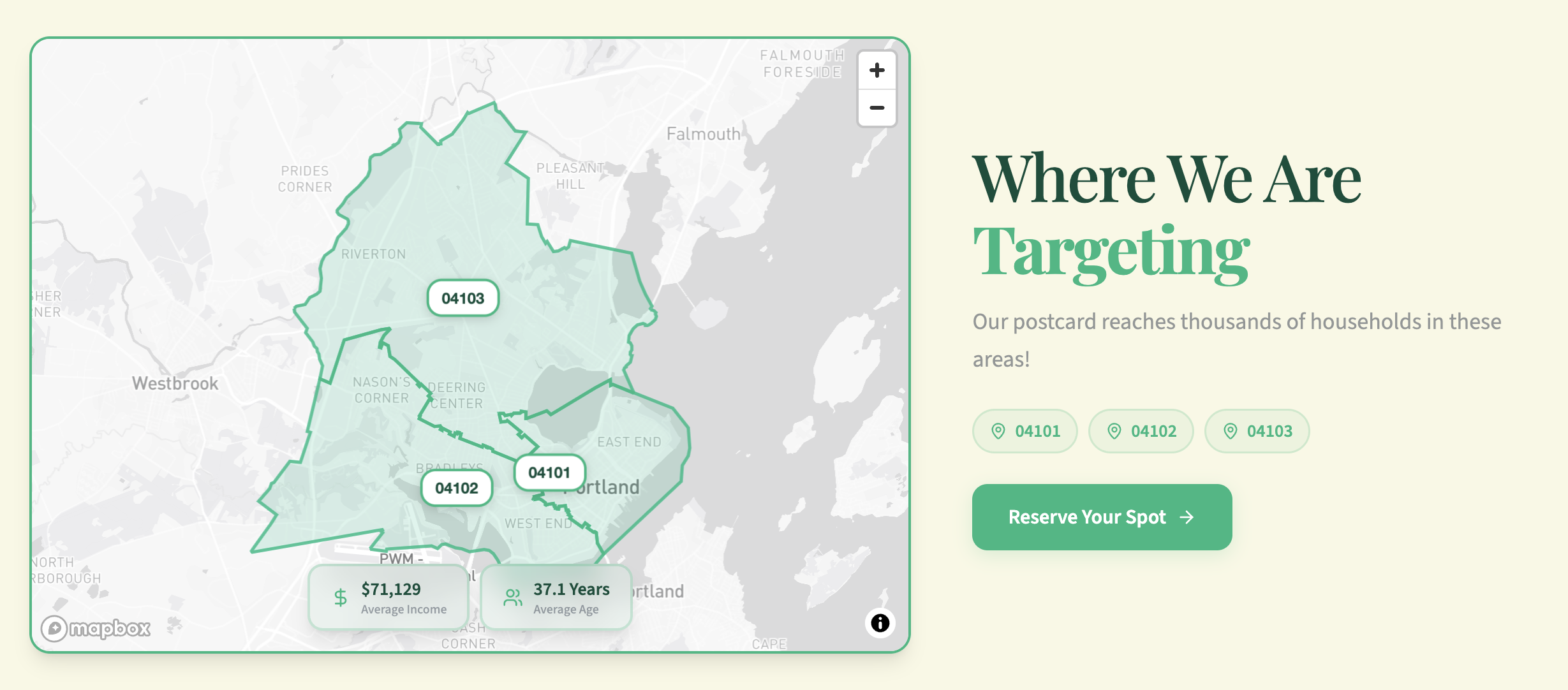
Here's why this matters. When you're selling a slot to a local business owner, their number one question is always "where is this going?" They want to know if it's hitting their customers. The target map answers that instantly without you saying a word.
The demographic data — household count, average age — gives prospects confidence that you know what you're doing. You're not just some person with a printer. You've done the research. You know the area. That's the energy this gives off.
Boring businesses make people wealthy. And boring tools that quietly build trust? Those make closing easier.
Built-in analytics — know what's working
Okay so here's where most operators are flying completely blind. They send people to their website and have zero clue what happens next. Did anyone visit? Did anyone fill out the form? What's the conversion rate?
9x12 Sites has a built-in analytics dashboard. No Google Analytics setup. No tracking pixel headaches. It's just there, waiting for you.
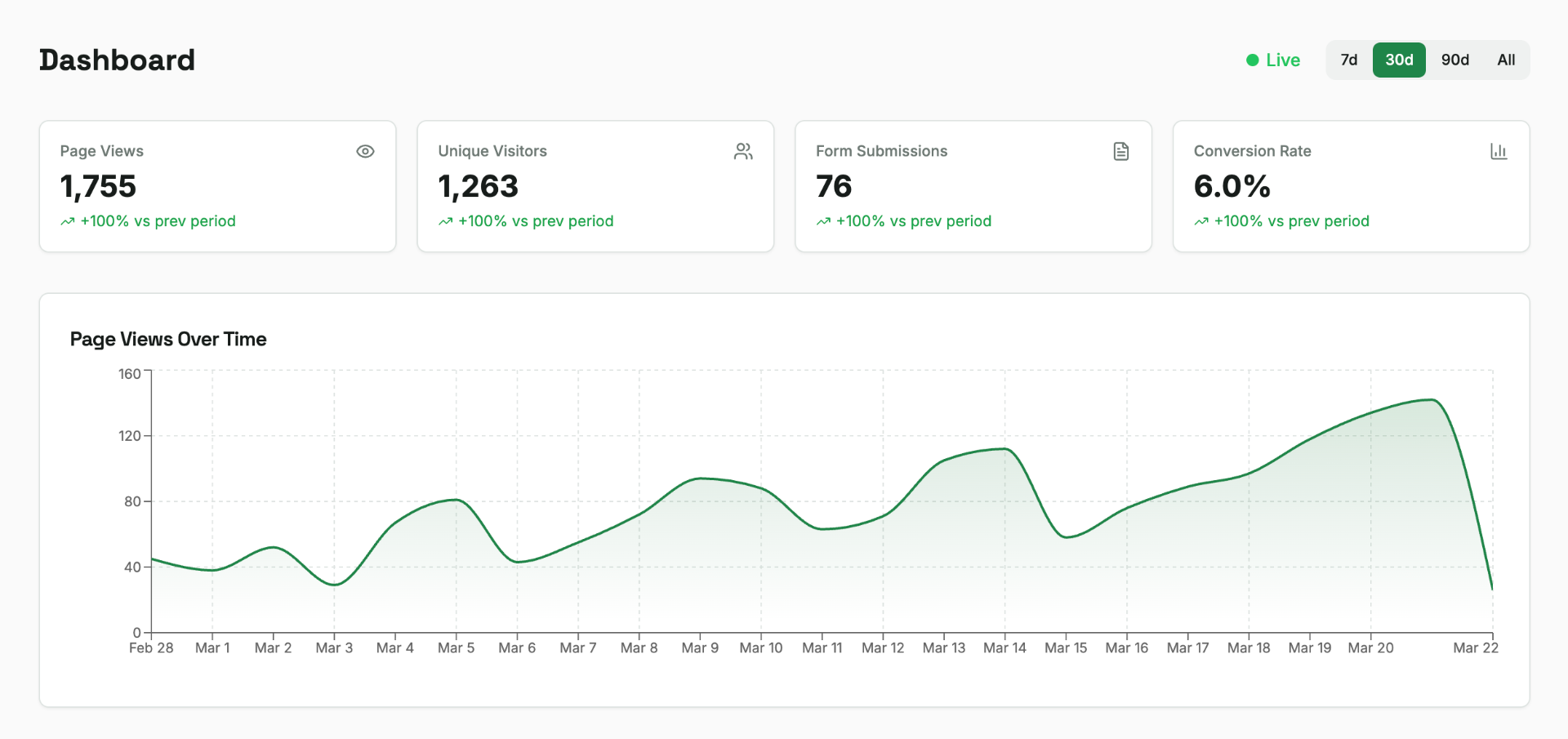
A 6% conversion rate means for every 100 people who land on your page, 6 of them fill out the form. That's real data you can use. If your conversion rate is low, maybe your card design needs work. If your page views are high but submissions are low, maybe your pricing section needs tweaking.
This is the kind of stuff that separates operators who stay stuck at one card from operators who scale to two or three cards a month. You can't improve what you can't measure. And now you can measure it without being a tech person.
Lead capture that actually works
Every 9x12 Sites page has a built-in contact form. When a prospect fills it out, their info goes straight into a lead management table inside your dashboard.
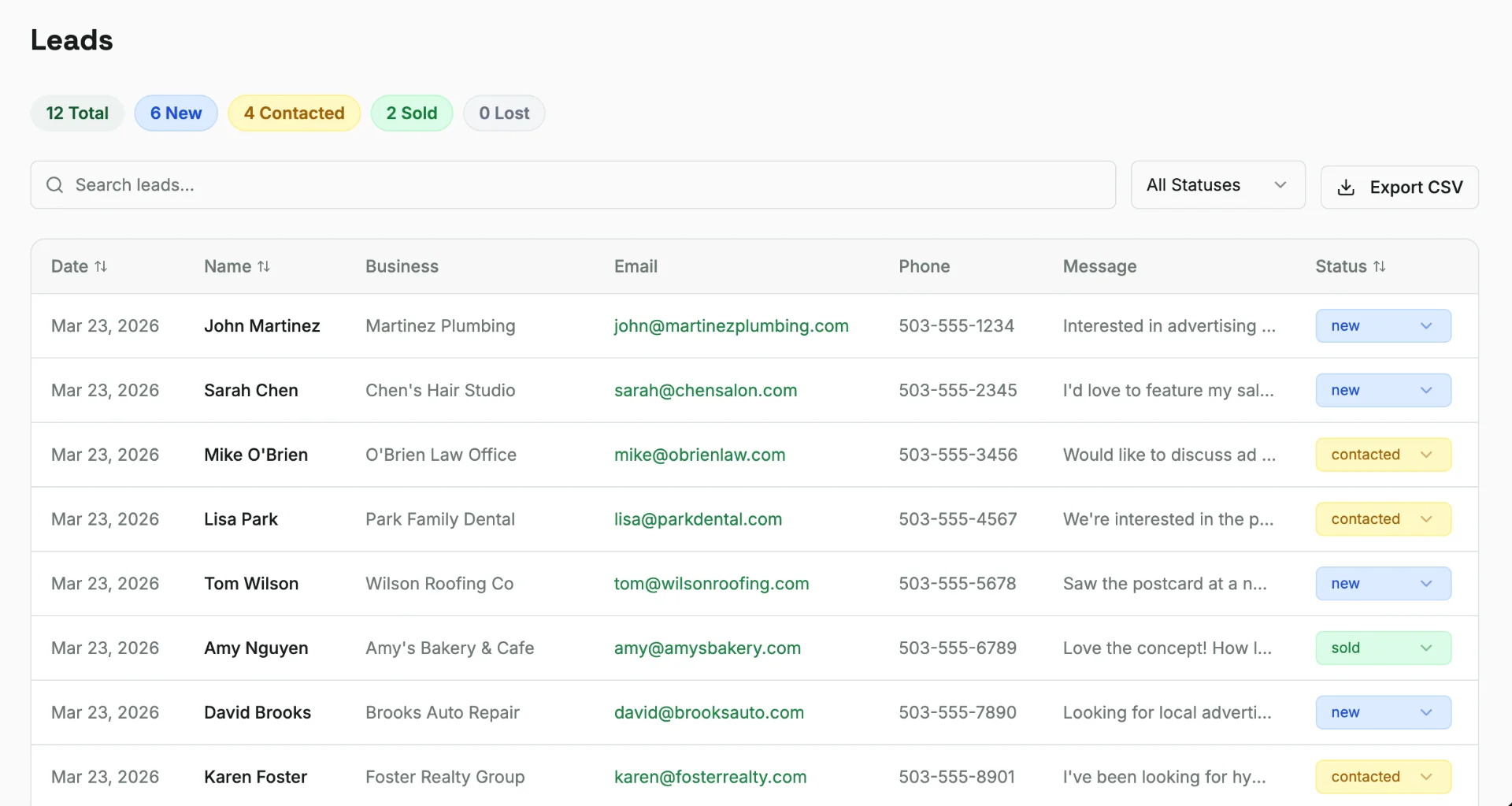
Each lead gets a status: new, contacted, sold, or lost. So you can track your entire pipeline right there. No spreadsheet. No sticky notes on your monitor. No "I think I forgot to follow up with that dentist."
This is a simple CRM right inside your site. And if you want something more robust, it pairs perfectly with the 9x12 Method CRM for managing your full business. But for a lot of operators — especially if you're running one or two cards — the built-in lead table is more than enough.
- Name, business, email, phone, and message captured automatically
- Status tracking so nobody falls through the cracks
- Everything in one place — no toggling between five different apps
QR codes and ScanLab — the perfect pairing
Here's where it all comes together. You've got your postcard going out to 5,000 homes. On that postcard, you've got a QR code. Where does that QR code point?
Your 9x12 Sites page.
Pair it with ScanLab and now that QR code doesn't just send people to your site — it tracks every single scan. You know how many people scanned, when they scanned, and you can see it right alongside your site analytics.
The flow looks like this:
- Build your 9x12 Sites page with the card preview, target map, and contact form.
- Generate a tracked QR code in ScanLab that points to your site URL.
- Put that QR code on your physical postcard design.
- Card goes out to 5,000 doors. People scan. They land on your site. They fill out the form.
- Leads appear in your dashboard. You follow up. You close.
That's a complete loop from mailbox to closed deal. No duct tape. No "I'll figure out the tech later." It just works.
9x12 Sites vs Our Local Spotlight — what's the difference?
This question comes up a lot. "I already have a listing on Our Local Spotlight — do I need a 9x12 Sites page too?"
Short answer: yes. They do different things.
Our Local Spotlight is a directory. It's like the Yellow Pages for 9x12 operators. You get a pin on the map, a profile, and when business owners in your area search for postcard advertising, they find you. It's a credibility and discovery tool. There are 300+ operators on there.
9x12 Sites is your standalone postcard marketing website. It's the page you send people to — from your QR code, your email signature, your Facebook messages, your cold outreach. It's got your card preview, your target map, your analytics, your lead capture.
They complement each other:
- Our Local Spotlight gets you found by people actively searching
- 9x12 Sites converts the people you send there yourself
Use both. Full transparency — I built both tools because operators kept asking for them and they solve different problems. Neither replaces the other.
Canva integration — your designs, your site
One thing I didn't want was operators having to re-create their card designs inside yet another tool. So 9x12 Sites connects directly to Canva.
In Step 5 of the setup wizard, you link your Canva account and pull in the card designs you've already built. They show up on your site automatically in the live card preview section. When you update the design in Canva, it updates on your site.
This means:
- No exporting PNGs and re-uploading them
- No version mismatch where your site shows an old design
- Your card preview always reflects your latest work
Full transparency — I do teach card design inside the community, and most operators use Canva for their designs anyway. So this integration just makes sense. You don't need to be a designer. The community has templates. Connect them and you're good.
The real numbers — what this means for your business
Let me zoom out for a second. You're running a postcard business. The numbers are straightforward:
Every tool in the 9x12 ecosystem exists to make filling those 16 slots easier and faster. 9x12 Sites is the piece that gives you a professional 9x12 operator website where prospects can see your card, see your target area, and raise their hand.
You don't need this tool to run the business. Plenty of operators fill cards without a website at all — just Facebook outreach and cold calls. But if you want to look professional, have a place to send warm leads, and actually track what's happening? This is it.
Full transparency — I'm the one who built this. I make money when you use it. But I also genuinely believe it makes operators more effective. You could absolutely skip it and still build a profitable postcard business. But why make it harder on yourself?
Getting started today
If you're ready to build your postcard business website, here's the play:
- Go to sites.9x12method.com and start the setup wizard.
- Have your business name, card name, and target zip codes ready.
- If you have Canva designs, connect them in Step 5. If not, use a template from the community first.
- Launch your site. Share the link everywhere — email signature, Facebook posts, cold outreach messages.
- Generate a QR code in ScanLab that points to your new site.
- Check your analytics dashboard weekly. Follow up on every lead same-day.
That's the whole thing. An afternoon of setup, and you have a 9x12 method landing page that works for you 24/7.
Honestly, the operators who do well in this business aren't the ones with the fanciest tech stack. They're the ones who set up the simple stuff and then go sell. 9x12 Sites is the simple stuff. Set it up. Then go sell.
As always, I'm rooting for you. Keep winning.
Frequently Asked Questions
Do I need technical skills to use 9x12 Sites?
Not at all. The entire thing is a guided wizard — six steps, fill in the blanks, hit publish. If you can type your business name and pick a color, you can build your site. No coding, no CSS, no "what's a DNS record" headaches. It was built specifically for operators who want to spend their time selling, not wrestling with technology.
How is 9x12 Sites different from building a WordPress or Wix site?
WordPress and Wix are general-purpose website builders. They can do anything, which means they require you to figure out everything — layout, plugins, forms, analytics, mobile responsiveness. 9x12 Sites is purpose-built for one thing: postcard operators. It has the card preview, the target map, the lead capture, and the analytics baked in. You'd need four or five WordPress plugins to recreate what 9x12 Sites gives you out of the box.
Can I use 9x12 Sites as my QR code destination?
Yes, and you should. Pair your site with ScanLab to create a tracked QR code that points to your 9x12 Sites page. When someone scans the code on your physical postcard, they land on your site where they can see the card, check the target area, and fill out the contact form. It's the cleanest way to turn a physical mailer into a digital lead.
Do I need 9x12 Sites if I already have an Our Local Spotlight listing?
Yes — they serve different purposes. Our Local Spotlight is a directory where business owners can discover you. 9x12 Sites is the standalone page you actively send people to from QR codes, emails, and outreach. Think of Our Local Spotlight as your listing in the phone book and 9x12 Sites as your storefront. You want both.
What kind of analytics does 9x12 Sites track?
Your dashboard shows page views, unique visitors, form submissions, and your conversion rate — all calculated automatically. There's also a page views over time chart so you can see trends. No third-party analytics tool needed. This tells you exactly how your site is performing and where you might need to make adjustments.
Can I update my card design on 9x12 Sites after I launch?
Absolutely. If you connected Canva in the setup wizard, your designs sync automatically. Update the card in Canva and it updates on your site. If you need to change pricing, swap out zip codes, or update your contact info, you can edit everything through the dashboard anytime. Your site is never "locked in" — it grows with your business.
Ready to start your 9x12 business?
Join the 9x12 Method community for scripts, templates, coaching calls, and a group that celebrates every win — even your first one.
Course + community included · Cancel anytime · Full transparency: you don't need this to start
More from the blog
Free vs Paid Direct Mail Software: Hidden Costs
Everybody loves free. Free CRM. Free lead finder. Free landing page builder. Free email tool. You Google "free direct mail software" and you get a page full of…
Lead Scout: Find Business Contacts Fast
If you've ever spent an entire afternoon Googling "plumbers near me," clicking through 40 websites, and copy-pasting emails into a spreadsheet one by one — you…
9x12 Method CRM: The Complete Guide
Most operators who struggle with this business aren't struggling because of sales. They're struggling because they forgot to follow up. They had the warm lead…